Logo generator7 min read
How to Choose a Logo From a Logo Generator
A practical way to compare logo generator results, narrow your shortlist and choose a design that fits your business before spending more time on it.
A logo generator solves one problem quickly: getting something on the screen. Choosing between the results can take much longer. You like the lettering in one, the symbol in another, and the colors in a third. Another round seems reasonable. Half an hour later, you have more logos and less idea which one to keep.
The way out is to decide what you're judging before you look again. This guide starts after the designs arrive, with a small shortlist and a few checks that help you choose. We'll use Harbor & Pine, a made-up coffee shop from our own case library, so you can see how the same name supports quite different directions.
If you're still writing the description for your first attempt, our guide to making a logo with an AI logo generator covers that part. Here, the drawing is done. Your job is to decide which drawing deserves more of your time.
Give the logo a job before you choose it
Start with a sentence about the business, without design words. For Harbor & Pine, that might be: "A neighborhood coffee shop near the waterfront, selling takeaway coffee and beans." Then write down its most common uses: the shop window, takeaway cups, bean bags and a small profile picture.
That sentence gives you something firmer than taste. A smiling cup might suit a friendly café where families stop after school. A restrained script name might fit a quieter coffee roaster selling carefully sourced beans. Neither is wrong on its own. One may be wrong for this shop.
Now pick the use that would be hardest to get wrong. If most customers first see your coffee in a delivery app, the small square matters early. If the shop is on a busy road, being able to read the sign from across the street matters more than a clever detail inside the symbol.
Keep that priority beside the shortlist. When two designs seem equally good, it gives you a reason to choose one.
Cut the shortlist down to three
Three candidates are enough to compare without turning this into an evening of sorting. They should be different directions, rather than nearly identical versions of the same idea. Keep the best candidate from each direction and put the rest aside.
Before you compare anything subtle, remove designs with obvious problems. Read the name slowly. Check that the picture says what you think it says. If a coffee cup looks like a soup bowl, or the lettering merges two letters, don't talk yourself into overlooking it because the colors are nice.
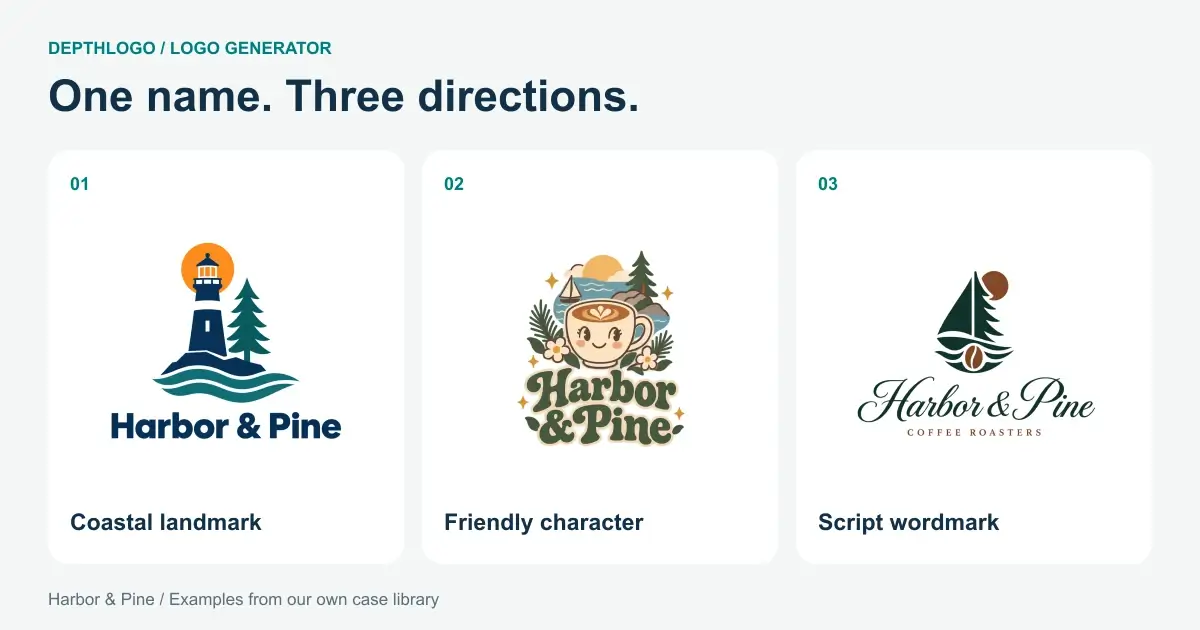
Our Harbor & Pine shortlist has a lighthouse with a bold name, a smiling latte cup surrounded by flowers, and a pine-tree sailboat above a script name. Each gives the shop a different character. The lighthouse suggests the waterfront. The cup says coffee immediately. The script makes the name itself part of the picture.
These are separate designs from our library, not edits to one original. That's how results from an AI logo generator often work: useful directions to compare, rather than a menu of interchangeable parts.
Separate the idea from its decoration
Look at each candidate and finish this sentence: "The idea is…" Keep the answer short enough to say without pointing at the screen.
For the lighthouse design, the idea is a coastal landmark beside a pine tree. For the smiling cup, it's a welcoming coffee character. If you need a long explanation involving every petal, wave and sparkle, the design may be carrying too much.
Then ask what you would remember if the colors changed. A recognizable silhouette or a particular arrangement of letters can survive a new palette. A design whose whole appeal comes from a fashionable shade may lose it as soon as you put it on your existing packaging.
This doesn't mean color is unimportant. It means you should know what you're buying into. Recoloring won't fix a symbol you don't like, and a stronger symbol won't make an unreadable name easier to read. Write those as separate observations instead of one vague "not quite right".
Compare the designs at the same size
A large logo usually looks more persuasive than a small one. Give each candidate the same space and the same background before you judge it. Otherwise you may be choosing the preview that got the most room.
Our comparison below puts each Harbor & Pine design inside an equal square, then shows the whole artwork reduced to 64 and 32 pixels. The small versions are deliberately small. Enlarging them to inspect every detail would miss the point.
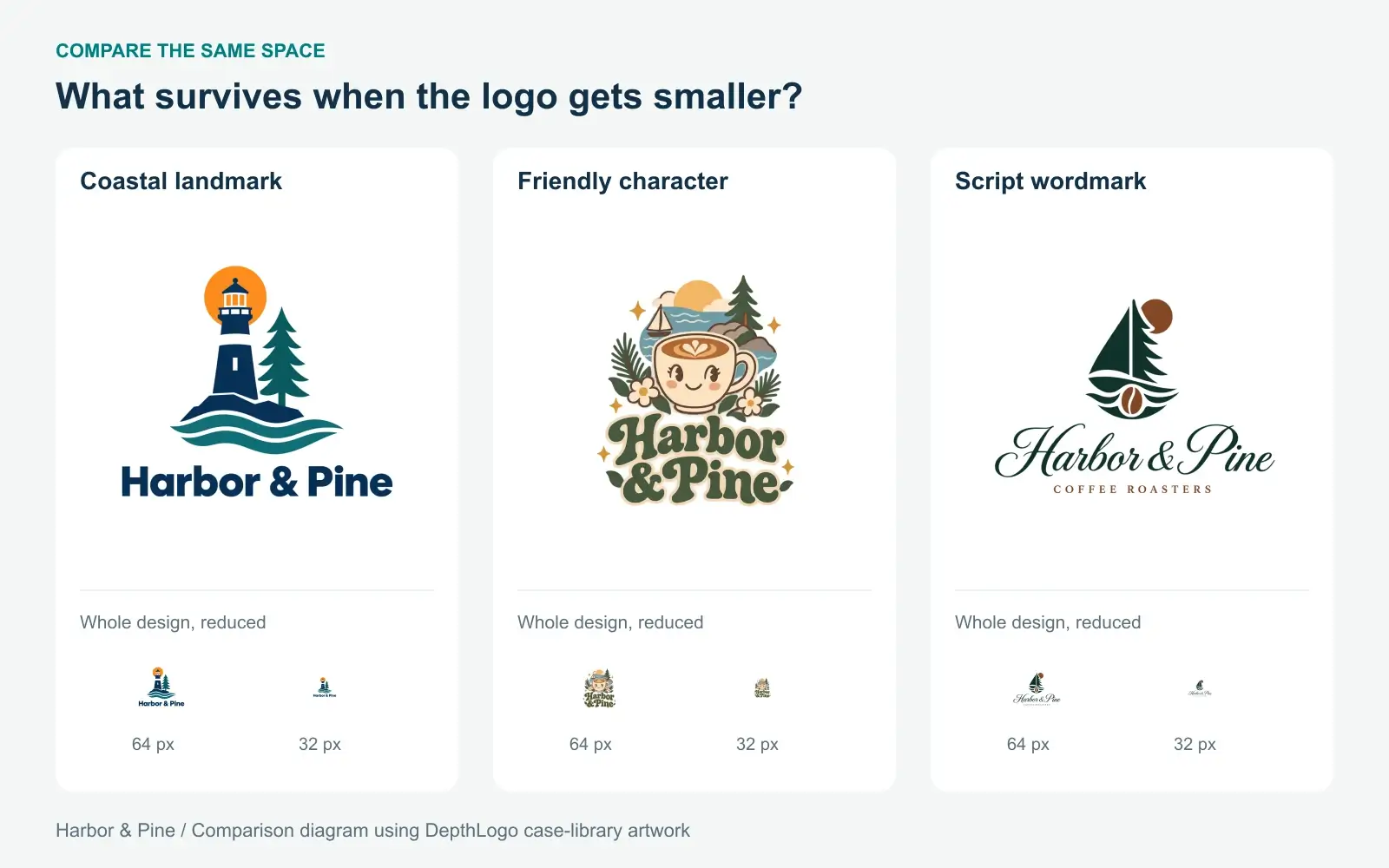
You won't read every word at 32 pixels, especially a slogan. Look for what survives: the overall shape, the main symbol, a distinctive letter. If nothing useful remains, the design will need a separate icon for tiny spaces.
That need isn't an automatic rejection. A long name can make a good main logo and a poor avatar. The question is whether you have a sensible way to make the small version, rather than hoping the whole design will somehow fit.
Put the shortlist where customers will see it
Next, leave the clean preview behind. Put each candidate into a rough layout for the place you named earlier: a cup label, your website header or a square profile picture. You don't need a polished presentation. A plain rectangle at roughly the right proportions is enough to expose awkward fits.
For the coffee shop, I'd start with the cup and the profile picture. On a cup, the friendly character has room to be part of the packaging. In a tiny circle, the same surrounding flowers may compete with the cup. The script version asks a different question: can you read the name quickly, or do you have to stop and decipher it?
Try the real background color too. A dark wordmark on a dark green bag may need a light version. That's a manageable extra file. A symbol that only makes sense when it is large and in full color is a bigger commitment if half your uses are small and printed in one ink.
For a design with depth, our comparison of a 3D logo and a flat logo explains those tradeoffs in more detail.
Ask for observations instead of votes
Showing someone three logos and asking which they like often gives you three personal color preferences. Ask something they can answer from what they see instead.
Show each candidate briefly, without explaining your favorite. Ask them to read the name and say what kind of business they expect. Hide the designs, then ask which detail they remember. One person won't settle the decision, but a repeated misreading is worth taking seriously.
If the lighthouse makes everyone expect a sailing club, you have learned something useful. You can decide whether the name, the surroundings and the coffee packaging give it enough context. If they repeatedly read the script name incorrectly, that is harder to explain away.
Keep the feedback in the person's own words. "I couldn't read Pine" gives you a task. "It needs to pop" doesn't. You're looking for problems you can act on, rather than permission to like your favorite.
Change one thing for a reason
By now you should know whether the best candidate has a small problem or the wrong idea. That difference tells you what to do next.
If the direction is right but the illustration is crowded, another generation needs a more focused description. Replace a long scene with one subject. Keep the style and colors steady so you can tell whether the description helped. Changing everything at once makes the next result difficult to learn from.
If you like the structure and mostly want control over type, spacing and color, browsing logo templates may be a better use of time. Our logo maker lets you adjust a template directly. A generated design bought as an SVG also opens in our editor for changing colors and moving, resizing or removing its parts. That doesn't turn its drawn lettering into ordinary editable text.
For more visual directions, our logo ideas can help you name what you're missing. Give yourself one specific thing to look for, such as a simpler symbol, rather than restarting the search from nothing.
Know when the choice is good enough
You can keep generating long after the useful decisions are made. Stop when a candidate fits the business, reads correctly and works in its main setting, with a clear plan for the smaller versions. You don't need unanimous approval or a design that wins every comparison.
Leave it overnight if you can. Look again in the morning at the size customers will see, not the largest preview. If your reasons for choosing it still hold, move forward.
The last step is checking the actual file. Our free logo checker looks for technical problems, including transparency, small-size detail and contrast. It won't choose the right personality for your café, but it can catch a file that will let your choice down.
Continue with how to read a logo checker report before using your logo. It takes the candidate you've chosen and turns the remaining warnings into a practical list of fixes, without sending you back through the whole shortlist.